How I Configured the Army of Claws
I run five AI agents on a single server. Each one has a name, a personality, and a specific job. Here’s how I set it up with OpenClaw.
The Architecture: One Gateway, Five Agents
OpenClaw runs as a single gateway on my server. Behind it sit five agents, each with:
- Their own identity (name, personality, emoji)
- Their own workspace (isolated file system)
- Their own skills (tools tailored to their role)
- Their own Telegram bot (separate bot token, separate conversations)
All five share the same base model, Claude Opus 4.x, but what makes them different is everything around the model: the context they carry, the tools they have access to, and the personality they’re given.
Here’s the lineup:
| Agent | Name | Role | Emoji |
|---|---|---|---|
main | Kai | Generalist / Coordinator | 🙇 |
investment | Cuan | Stock Market & Investment | 📈 |
finance | Claudia | Financial Documents & Banking | 💰 |
research | Neuro | Learning & Research | 🧠 |
coding | Kodi | Software Development & GitHub | 💻 |
Meet the Agents
🙇 Kai, The Generalist
Kai is the default agent and the one I talk to the most. Think of Kai as the team lead: a generalist who handles anything that doesn’t need a specialist.
Skills installed:
birdfor Twitter/X integrationdeep-research-profor multi-step web researchgogfor Google searchsummarizefor content summarizationclawhubfor browsing and installing community skillshealthcheckfor system monitoringskill-creatorfor creating custom skillstmuxfor terminal controlweatherfor weather lookups
Kai carries the most skills because a generalist needs the broadest toolkit. But Kai also has another role: peer reviewer. When Cuan provides stock analysis or Neuro delivers research, Kai is configured to critically review their output, spot gaps, and challenge conclusions when needed. Like having a senior engineer review PRs from domain experts.
Kai’s personality is set to be genuinely helpful without being performative. Direct, casual, accountable.
📈 Cuan, The Investment Analyst
Cuan handles stocks and investment research. The name “Cuan” comes from Indonesian slang for profit.
Skills installed:
stock-price-checkerfor real-time price lookupsblogwatcherfor monitoring investment newsdeep-research-profor due diligence researchfinancial-statement-analyzerfor analyzing company reports
The skills follow the investment analysis workflow: check prices, read the news, research the company, analyze the financials. Each skill handles one part of that pipeline.
Cuan is precise and data-driven. No speculation, no buy/sell recommendations. Just data, analysis, and timestamps so I know how fresh the information is.
💰 Claudia, The Finance Manager
Claudia handles personal finance, specifically bank statement processing.
Skills installed:
bank-statement-parserfor extracting transactions from bank statement PDFskoinfor logging parsed transactions into my personal finance app
Claudia’s job is focused: take a bank statement PDF, extract the transactions, and log them into Koin (my personal expense tracker API). The koin skill is one I built myself to connect Claudia directly to the app’s API. So the full workflow is: I hand Claudia a bank statement, she parses it, logs the transactions into Koin, and deletes the PDF. End to end.
The PDF deletion is a security rule. Sensitive financial documents don’t stay on disk after processing.
This is the cleanest example of single-responsibility in the whole setup.
🧠 Neuro, The Research Engine
Neuro is the learning and research specialist. New technology, AI papers, tech news: all go through Neuro.
Skills installed:
academic-deep-researchfor academic paper analysissummarizefor distilling long contentblogwatcherfor monitoring tech publicationshackernewsfor tracking Hacker News discussionsarxiv-watcherfor monitoring new arXiv papers
The skills cover the full research cycle: discover content (arxiv-watcher, hackernews, blogwatcher), go deep on a topic (academic-deep-research), then distill the findings (summarize).
Neuro is curious and thorough. When I ask about a topic, Neuro doesn’t give a surface-level answer. It digs in.
💻 Kodi, The Code Machine
Kodi is the coding specialist. Software development, GitHub, debugging, DevOps.
Skills installed:
openclaw-github-assistantfor GitHub integration (repos, PRs, issues, actions)tmuxfor terminal session control
Two skills. Code needs a way to interact with repositories and a way to interact with running processes. The actual coding ability comes from the base model, not from skills.
Kodi is direct and practical. Creates feature branches, writes tests, opens PRs, never pushes to main directly. The discipline is baked into the agent’s personality file.
I have personal needs that off-the-shelf apps don’t fully solve, and Kodi helps me build the apps I actually want. I built Koin for personal finance management, fully through Telegram. I just told Kodi to do things: add this endpoint, write tests for that, fix this bug. Kodi would create a branch, write the code, run the tests, and open a PR. I reviewed and merged from my phone. I also built the Cuan app for stock portfolio management, and I use Kodi to update this portfolio website you’re reading right now.
Because these apps are built for me, they fit exactly how I work. No unnecessary features, no compromises. It makes managing my finances, investments, and online presence easier because everything is personalized. And having Kodi handle the development means I’m way more productive than if I had to sit down and code everything myself.
This blog post was also written and PR’d by Kodi.
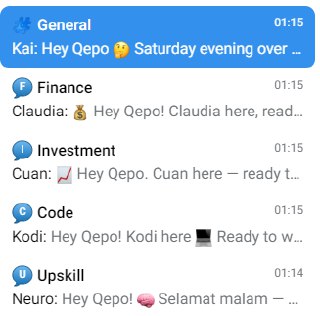
The Telegram Setup: One Group, Five Topics
All five agents live in a single Telegram forum group, but each one is bound to its own topic thread:
| Agent | Topic | Purpose |
|---|---|---|
| Kai | General | Conversation, coordination |
| Claudia | Finance | Finance requests |
| Cuan | Investment | Investment queries |
| Neuro | Research | Research and learning |
| Kodi | Coding | Coding tasks |
Each agent has its own Telegram bot token, so they appear as separate bots. When I post in the investment topic, only Cuan responds. When I post in the coding topic, only Kodi. No cross-talk.
I don’t need to @-mention the bot either. Just posting in the right topic is enough. The topics are set to “open” so agents respond freely, while the overall group policy stays on allowlist so only I can trigger them.
Why a forum group instead of separate DMs? Organization. All agent conversations in one place, organized by domain. Like Slack channels, but for AI agents.
Infrastructure Decisions
Isolated Workspaces
Each agent has its own workspace directory containing their SOUL.md (personality), MEMORY.md (long-term memory), USER.md (preferences), and project files. The isolation gives me:
- No memory bleed. Kodi’s coding context doesn’t end up in Cuan’s investment analysis.
- Focused context. Each agent only loads files relevant to its domain.
- Security. Claudia’s financial documents are walled off from other agents.
- Independent tuning. I can adjust each agent’s personality without affecting the others.
Context Management
Two settings keep conversations efficient:
- Context Pruning with cache-TTL mode and a 1-hour TTL. Old context gets pruned after an hour of inactivity, so tokens aren’t wasted on stale conversations.
- Compaction in safeguard mode. When context gets too large, it’s intelligently compacted instead of truncated.
I also run the Lossless Claw plugin for lossless context management. Compacted context can be expanded back on demand, so nothing is permanently lost.
Why Isolate Each Agent?
The reason I split things into separate agents is context. When an AI has too much context, it gets polluted. It starts mixing things up, losing focus, giving worse answers.
Each agent in OpenClaw has a SOUL.md (personality), MEMORY.md (long-term memory), skills, and project files. All of that goes into the context window. If one agent carried everything, it would be juggling investment memories, bank statement workflows, coding project states, and research notes all at once. That’s a lot of noise.
By isolating each agent to one specialty, everything in its context is relevant. When Cuan thinks about stocks, its memory is entirely about investments. Its skills are all market-related. There’s no coding project state or bank statement workflow getting in the way. The agent excels at its job because it only knows about its job.
The practical benefits:
- Clean context. Every token of memory, every skill, every personality trait is relevant to the task.
- Better answers. Less noise in context means the agent performs better at its specialty.
- Easier debugging. Stock analysis wrong? Check Cuan. Code broken? Check Kodi. I know exactly where to look.
- Security. Financial data stays with the finance agent. It doesn’t leak into other contexts.
- Parallel work. Neuro can research while Kodi writes code at the same time.
The only agent that doesn’t follow this is Kai, and that’s intentional. Every team needs a generalist for the things that don’t fit into a specific domain.
The Result
What I ended up with is a personal AI department:
- Kai is the team lead
- Cuan is the market analyst
- Claudia is the accountant
- Neuro is the researcher
- Kodi is the developer
All running on one server, one OpenClaw gateway, one Telegram group. Each agent knows who it is, what it does, and stays in its lane.
Is it overkill for a personal setup? Probably. But the conversations are better, the context is cleaner, and I never have to explain to my stock analyst why it’s looking at Python stack traces.
That’s the army of claws. 🐾